
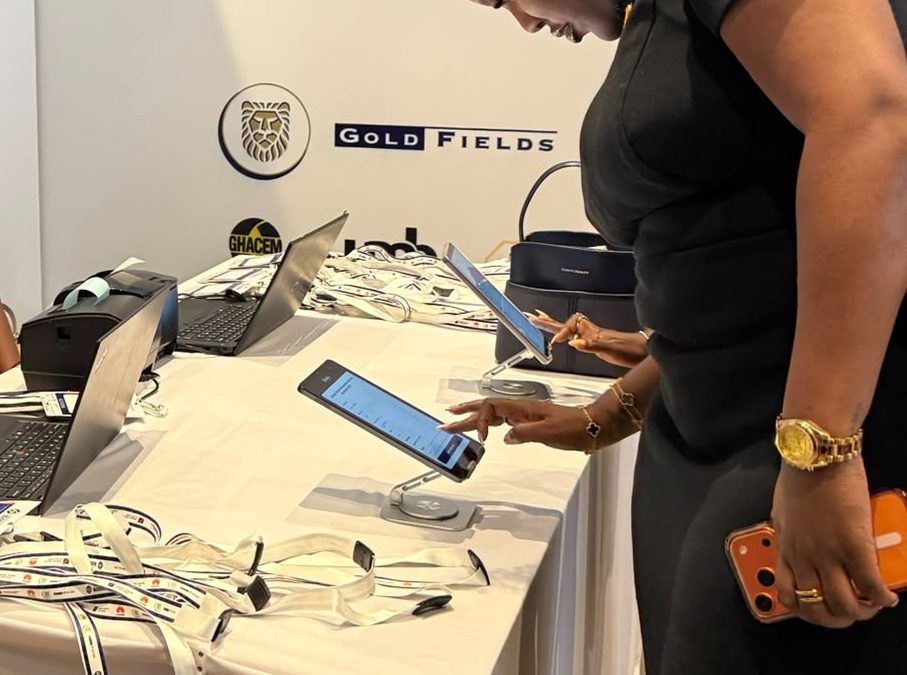
Event badge printing can make conference registration faster, more professional, and easier to manage from the moment attendees arrive. For many conferences, the registration desk is the first real interaction an attendee has with the event. If the process is slow or confusing, it can create a poor first impression before the program even begins.
Imagine a conference in Accra where hundreds of attendees arrive within the same 30-minute period. Some are pre-registered. Others are walk-ins. A few cannot find their confirmation details. Registration staff are searching through spreadsheets while attendees wait in line.
Now add handwritten name tags, unreliable internet, missing attendee information, and multiple registration desks. The result can be unnecessary stress for organizers and frustration for guests.
A well-planned badge printing and check-in process changes this experience. With the right technology and registration setup, attendees can be verified, checked in, and given a clean, branded badge within seconds.
What Is Event Badge Printing?
Event badge printing is the process of producing personalized name badges or tags for attendees during or before an event. Instead of preparing hundreds of generic name tags manually, organizers can connect attendee registration information to an onsite printing process.
A badge may include:
- Attendee name
- Organization or company
- Job title
- Event branding
- Attendee category
- QR code or barcode
- Access information
- Session information
- Sponsor branding
For conferences, this information helps attendees identify one another while also helping event teams manage access and attendance.
Why Conferences Need Professional Event Badges
A conference badge is more than a piece of paper around someone’s neck. It can become an important part of the attendee experience.
1. Faster attendee identification
Registration teams can quickly identify attendees by checking their printed badges. This is especially useful when conferences have different categories such as speakers, VIPs, exhibitors, sponsors, media, and general attendees.
2. A more professional first impression
A clean, professionally printed badge immediately makes the event feel more organized. For corporate conferences, exhibitions, church conventions, NGO programs, and professional seminars, presentation matters. A well-designed badge can reinforce the event’s branding from the moment someone enters the venue.
3. Easier networking and communication
Attendees often want to know who they are speaking to. A badge displaying a person’s name, organization, or role can make introductions easier and encourage networking. At business conferences, this can be particularly valuable because attendees may meet potential clients, partners, suppliers, or employers.
4. Better access control
Different badge types can help staff distinguish between attendee categories.
For example:
- Speaker
- VIP
- Exhibitor
- Sponsor
- Media
- General attendee
- Staff
This makes it easier for event teams to determine who should have access to specific areas or sessions.
5. More accurate attendee information
When badges are generated from structured registration data, organizers reduce their dependence on handwritten information. This can help minimize spelling mistakes, missing details, and illegible handwriting.
The Problems with Manual Conference Name Tags
Many event organizers start with simple solutions because they appear inexpensive and easy. However, manual registration can become difficult as attendee numbers increase.
Handwritten tags create errors
Handwritten names can be difficult to read and may contain spelling mistakes. An attendee who registered as “Kwame Mensah” should not have to wear a badge that says “K. Mensa” because someone rushed through registration.
Long queues slow down entry
When staff manually search for names, confirm payments, write badges, and hand them to attendees, each registration can take several minutes. Multiply that by hundreds of people and queues quickly form.
Poor internet can disrupt registration
Connectivity is another consideration for Ghanaian events. A conference venue may have unreliable internet access, particularly when many devices are connected simultaneously. A registration system that can support offline and online check-in gives organizers more flexibility.
Registration desk confusion affects the attendee experience
Without a clear process, registration teams may struggle with questions such as:
- Where should pre-registered guests go?
- Where should walk-ins register?
- Who handles VIPs?
- Who prints badges?
- Who handles payment issues?
- Who assists attendees who cannot find their records?
Good planning and dedicated registration support can prevent these issues.
Limited visibility makes event management harder
Organizers need to know what is happening at the registration desk.
How many people have arrived?
How many are still expected?
Which attendee categories are checking in?
What is the registration rate?
Real-time reporting can turn this information into something the event team can actually use.
How Event Badge Printing Works
A professional badge printing process can be straightforward when the right systems are in place.
Step 1: Collect attendee information
Attendee information is collected during online or onsite registration. Depending on the event, this can include names, phone numbers, email addresses, organizations, job titles, ticket types, and other relevant information.
Step 2: Organize registration data
The information is connected to the event’s registration database. This creates a single source of attendee information instead of forcing staff to work across multiple spreadsheets and paper lists.
Step 3: Verify the attendee
When the attendee arrives, the registration team can locate their record or scan their QR code or barcode. Scan. Check-In. Done in Seconds.
Step 4: Print the badge or name tag
Once the attendee has been verified, their personalized badge can be printed onsite. This allows the event team to handle pre-registered guests while also supporting last-minute registrations and walk-ins.
Step 5: Scan, check in, and welcome the attendee
After the badge is printed, the attendee can proceed into the event. The registration team can continue monitoring attendance through live reporting.
What Information Should a Conference Badge Include?
There is no single design that works for every conference. However, most professional conference badges should include the information that helps attendees and staff identify people quickly.
Consider including:
- Attendee name: The most prominent element.
- Organization: Useful for professional networking.
- Job title: Helpful at business conferences.
- Event name: Establishes event identity.
- QR code or barcode: Supports digital validation.
- Attendee category: Helps with access management.
- Session information: Useful for events with multiple tracks.
- Sponsor branding: Can provide additional visibility for event partners.
Avoid overcrowding the badge. The most important information should be readable from a reasonable distance.
How Ayalogbook Simplifies Event Badge Printing
Ayalogbook combines onsite registration, attendee validation, badge printing, and event reporting into a practical registration workflow. Instead of treating badge printing as a separate activity, organizers can make it part of the complete check-in experience.
Fast, Professional On-Site Registration
The registration desk should move attendees forward rather than become a bottleneck. Ayalogbook helps event teams create a more structured front-desk process, from attendee verification to badge printing and check-in.
Scan. Check-In. Done in Seconds.
QR and barcode validation helps staff quickly confirm attendee records. This reduces the need to manually search through long registration lists and gives attendees a smoother arrival experience.
Clean, Branded Name Tags in 12 Seconds.
Professional badge printing gives attendees a clear identification tag while reinforcing the event’s branding. For conferences, exhibitions, corporate events, and other professional gatherings, this small detail can make the registration area feel significantly more organized.
Real-Time Numbers You Can Actually Use.
Registration doesn’t end when a badge is printed. Organizers need to know what is happening throughout the event. Ayalogbook provides real-time attendee tracking and reporting, allowing teams to monitor check-in activity and understand attendance patterns as the event progresses.
All Your Guest Data in One Place.
Instead of relying on disconnected lists, paper forms, and spreadsheets, organizers can manage guest information through a centralized registration workflow. This can improve data quality while making post-event reporting easier.
Event Badge Printing for Conferences in Ghana
Ghanaian conferences can range from small professional workshops to large corporate events, exhibitions, church programs, NGO conferences, and industry gatherings.
The registration requirements can also vary significantly.
For example, a conference in Accra may have several hundred pre-registered attendees arriving around the same time. A corporate event may need badges that clearly distinguish executives, staff, speakers, and guests. An exhibition may need separate identification for exhibitors, visitors, media, and sponsors. A church conference may have a large number of attendees arriving during a short registration window.
In each case, the goal remains the same: get people through registration efficiently while maintaining accurate attendee information. This is where a combination of QR validation, onsite badge printing, walk-in registration, offline capability, and registration support becomes valuable.
Best Practices for a Successful Conference Badge Printing Setup
Prepare your attendee data early
Review registration information before the event. Check for duplicate records, incomplete information, and obvious errors.
Use clear badge designs
Avoid filling the badge with unnecessary information. Make the attendee’s name easy to see and ensure QR codes or barcodes are large enough to scan reliably.
Plan for walk-in attendees
Not everyone will register online. Your process should account for people who arrive at the venue without a prior registration. A walk-in workflow prevents these guests from disrupting the main registration queue.
Have a backup for internet problems
Internet connectivity should not become a single point of failure. An onsite registration solution with offline and online check-in capabilities gives organizers greater resilience.
Assign trained registration staff
Technology works best when the people operating it understand the process. Assign clear responsibilities for scanning, registration, badge printing, guest assistance, and troubleshooting.
Test your equipment before the event
Do not wait until attendees arrive to test your printers and scanners. Conduct a full registration simulation before the event begins.
Test:
- QR scanning
- Badge printing
- Walk-in registration
- Attendee lookup
- Printer connections
- Offline procedures
- Different badge categories
How to Choose an Event Badge Printing Solution
When comparing solutions, don’t focus only on the printer. Look at the complete registration workflow.
A good solution should support:
- Fast badge printing
- Accurate attendee data
- QR and barcode validation
- Online and offline check-in
- Walk-in registration
- Custom badge designs
- Real-time attendance reporting
- Professional registration support
- Efficient registration desk management
- Integration with ticketing or registration systems
The best solution is the one that reduces work for your registration team while improving the experience for attendees.
Event Badge Printing Checklist for Organizers
Before opening your registration desk, make sure you have:
- Confirmed attendee information
- Selected and tested the badge design
- Tested badge printers
- Prepared registration desks
- Set up QR or barcode scanning
- Trained registration staff
- Prepared for walk-in attendees
- Tested offline registration procedures
- Confirmed attendee categories and access requirements
- Tested the complete check-in workflow
- Set up attendee monitoring and reporting
Frequently Asked Questions About Event Badge Printing
What is event badge printing?
Event badge printing is the process of producing personalized attendee badges or name tags using registration information. Badges can include names, organizations, attendee categories, QR codes, and event branding.
Why are printed badges important at conferences?
Printed badges help attendees identify one another, support access management, improve event branding, and make the registration experience more professional.
Can badges be printed for walk-in attendees?
Yes. A properly designed onsite registration workflow can allow organizers to register walk-in attendees and print personalized badges during the event.
Can event badges include QR codes?
Yes. QR codes can be included on event badges and used as part of attendee validation, session tracking, or access management.
What happens if the internet connection is unreliable?
Organizers can reduce the impact of connectivity problems by using an onsite registration solution that supports offline and online check-in capabilities.
How can Ayalogbook help with conference registration?
Ayalogbook supports onsite registration, QR and barcode validation, badge and name tag printing, walk-in registration, offline and online check-in, attendee tracking, reporting, and professional registration support.
Conclusion: Make Conference Registration Faster and More Professional
Conference registration should not be the part of the event that attendees remember for the wrong reasons.
Long queues, handwritten tags, registration errors, connectivity problems, and unclear desk responsibilities can create unnecessary pressure for organizers.
Professional event badge printing provides one important piece of the solution. When combined with QR scanning, streamlined check-in, walk-in registration, offline capabilities, real-time reporting, and trained registration support, badge printing can become part of a much smoother onsite experience.
For conferences and other events in Ghana, Ayalogbook helps organizers move beyond manual registration and create a professional front-desk experience.
The result is simple: faster entry, better attendee experiences, improved data quality, less stress for organizers, and useful insights after the event.
If your next conference needs fast, professional on-site registration, Ayalogbook can help you build a registration experience that works from the first scan to the final attendee report.