
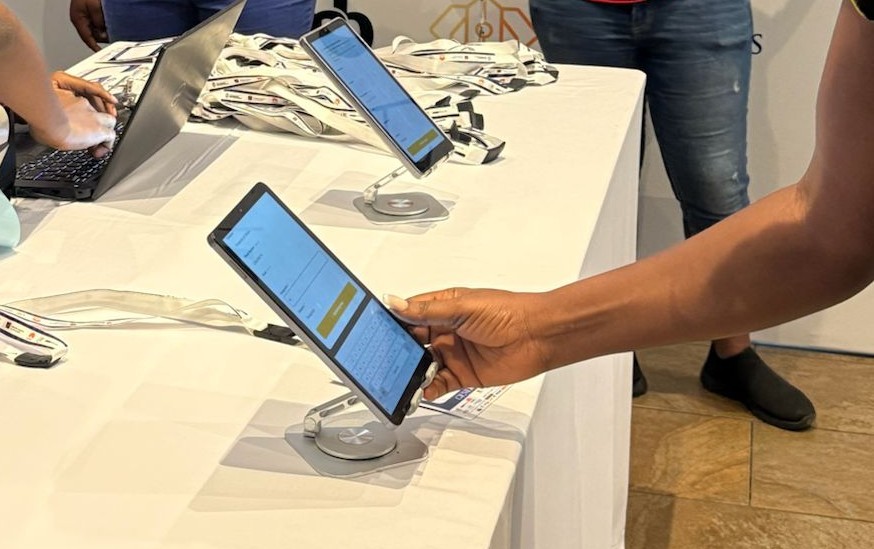
Planning an efficient registration desk is essential for large events where hundreds or thousands of attendees may arrive within a short period. A well-organised registration area can reduce queues, prevent registration errors, speed up check-in, and create a professional first impression.
For conferences, exhibitions, corporate events, church programmes, festivals, and entertainment events in Ghana, registration is often one of the busiest parts of the attendee journey. If the process is slow or confusing, guests may spend valuable time waiting before they even enter the venue.
The good news is that an efficient registration desk does not happen by accident. With the right layout, trained staff, reliable technology, clear processes, and proper attendee data management, event organisers can make registration faster and easier for everyone.
Why an Efficient Registration Desk Matters
Your registration desk is more than a place where guests collect badges. It is the first major point of contact between attendees and your event team.
A poorly planned desk can result in:
- Long queues at peak arrival times
- Confusion about where attendees should go
- Incorrect or missing registration information
- Handwritten name tags that look unprofessional
- Slow manual searches through attendee lists
- Duplicate registrations
- Difficulty handling walk-in guests
- Registration staff becoming overwhelmed
- Poor visibility into how many people have arrived
- Problems when internet connectivity becomes unreliable
At a large conference in Accra, for example, hundreds of attendees could arrive within the same 30-minute period. If every guest has to provide their details manually and wait for staff to search through spreadsheets, queues can build quickly.
A well-designed registration process turns this potential bottleneck into a smooth entry experience.
1. Understand Your Expected Attendee Volume
The first step in planning an efficient registration desk is understanding how many people you expect and when they are likely to arrive.
Do not plan your registration area based only on the total number of attendees.
Consider:
- Total expected attendance
- Number of pre-registered guests
- Expected walk-ins
- VIPs and special guests
- Speakers and exhibitors
- Staff and event crew
- Expected peak arrival periods
- Number of registration points available
For example, an event expecting 1,500 attendees may not have 1,500 people arriving evenly throughout the day.
If 700 people are expected between 7:30 a.m. and 9:00 a.m., your registration desk needs to be designed around that peak period.
This is where proper planning makes a major difference.
2. Create Separate Registration Points
One of the simplest ways to reduce congestion is to avoid making every attendee use the same queue.
Depending on your event, consider separate points for:
- Pre-registered attendees
- Walk-in registration
- VIPs
- Speakers
- Exhibitors
- Media
- Staff and event crew
Pre-registered attendees should generally have the fastest route into the venue.
If their information is already in your registration system, there is little reason to make them complete the entire registration process again.
A QR or barcode can allow staff to quickly locate and validate their registration.
Scan. Check-In. Done in Seconds.
This approach keeps the main registration queue moving while giving staff more time to deal with exceptions or new registrations.
3. Plan the Registration Desk Layout
Technology alone cannot solve a poorly organised physical space. Your registration area should have a clear flow from arrival to entry.
A simple structure could be:
Entrance → Queue → Registration/Scanning → Badge Printing → Help Desk → Event Entrance
Avoid placing registration desks directly in narrow entrances or areas where arriving guests will block people leaving the venue. Make signs easy to see from a distance.
For large events, clearly label areas such as:
- PRE-REGISTERED
- WALK-IN REGISTRATION
- VIP
- SPEAKERS
- EXHIBITORS
- HELP DESK
The objective is simple: attendees should know where to go without repeatedly asking registration staff for directions.
4. Use QR Codes for Faster Check-In
Manually searching for every attendee can slow down registration considerably.
QR code check-in provides a faster alternative.
When an attendee has a QR code on their ticket or registration confirmation, registration staff can scan it to validate the guest’s information.
This can help reduce:
- Manual data entry
- Name-search delays
- Duplicate registrations
- Check-in errors
- Unnecessary paperwork
For events using digital ticketing, connecting ticket sales and onsite registration can make the process even smoother.
With an integrated workflow, attendee information can move from registration and ticketing into the onsite check-in process without requiring staff to repeatedly enter the same information.
5. Prepare for Walk-In Attendees
Even if your event encourages online registration, you should expect some people to register at the venue.
Walk-ins may include attendees who:
- Did not register online
- Decided to attend at the last minute
- Have registration problems
- Cannot find their confirmation
- Need to change their attendee information
Create a dedicated walk-in process rather than allowing these cases to disrupt the main check-in queue. A registration system should allow staff to capture guest information quickly and add the attendee to the event database.
This is particularly useful for conferences, church events, exhibitions, and public events where last-minute attendance is common.
6. Make Onsite Badge Printing Part of the Process
Handwritten tags may seem convenient, but they can quickly become a problem at large events.
They may be:
- Difficult to read
- Inconsistent
- Easily damaged
- Unprofessional-looking
- Time-consuming to prepare
Professional onsite badge printing allows attendee details to be printed clearly as part of the registration process.
This can include:
- Attendee name
- Company or organisation
- Job title
- Attendee category
- QR code
- Event branding
For a professional conference in Accra or Kumasi, a clean branded badge immediately makes the registration experience feel more organised.
Clean, Branded Name Tags in 12 Seconds. The goal is not simply to print a badge. It is to make the entire registration-to-entry process faster.
7. Have Enough Registration Staff
Technology helps, but people still matter.
Assign staff based on the expected workload and responsibilities.
For example:
Registration Staff
- Scan attendee tickets
- Confirm registration
- Print badges
- Assist with simple registration questions
Walk-In Staff
- Register new attendees
- Collect required information
- Process applicable payments
Help Desk Staff
- Resolve registration problems
- Handle duplicate records
- Assist guests who cannot find their registration
Queue Support Staff
- Direct attendees
- Answer basic questions
- Keep lines organised
Avoid giving one person too many responsibilities during peak arrival periods.
A registration desk becomes inefficient when the same staff member is expected to scan tickets, search attendee lists, print badges, answer questions, handle walk-ins, and solve technical issues simultaneously.
8. Have a Backup Plan for Internet Problems
Internet connectivity should always be considered when planning an event registration desk. Even in major cities such as Accra, organisers should not assume that connectivity will always be perfect. An internet interruption can become a major problem if your entire registration operation depends on a live connection.
Where possible, prepare an offline or contingency check-in process.
Your plan should cover:
- What happens if the internet goes down?
- Can attendees still be validated?
- Can registration staff continue working?
- How will walk-ins be recorded?
- How will information be synchronised later?
- Who is responsible for resolving technical problems?
A registration platform with offline and online check-in capabilities can help organisers maintain operations when connectivity becomes unreliable.
9. Monitor Attendee Numbers in Real Time
An efficient registration desk should give organisers more than a smooth check-in process. It should also provide useful information about what is happening at the event.
Real-time attendee reporting can help answer questions such as:
- How many people have checked in?
- What percentage of registered attendees have arrived?
- When was the busiest arrival period?
- How many walk-ins have registered?
- How many VIPs or special guests have arrived?
- Which sessions are attracting the most attendees?
Real-Time Numbers You Can Actually Use.
This information can help event managers make better operational decisions during the event. For example, if registration data shows that attendance is significantly higher than expected, organisers can respond by adjusting seating, catering, security, or staffing.
10. Prepare for Session Attendance
Large conferences often have multiple sessions taking place throughout the day.
Checking people into the main event is only part of the challenge.
Organisers may also need to know who attended:
- Workshops
- Breakout sessions
- Training sessions
- VIP meetings
- Exhibitor sessions
- Seminars
Session attendance monitoring can help organisers understand attendee behaviour and participation. It can also provide useful information for sponsors, speakers, event managers, and marketing teams after the event. Instead of relying on paper attendance sheets, digital session check-in can provide cleaner and more reliable records.
11. Train Your Registration Team Before the Event
Even the best registration technology can perform poorly if staff do not know how to use it.
Before the event, conduct a full registration rehearsal.
Staff should understand how to:
- Scan QR codes
- Search for attendees
- Register walk-ins
- Print badges
- Correct attendee information
- Handle duplicate registrations
- Escalate technical problems
- Assist VIPs and special guests
- Use offline procedures
- Direct attendees to the correct areas
Run through realistic scenarios.
For example:
Scenario 1: The attendee’s QR code cannot be scanned.
Scenario 2: The attendee registered but cannot find their confirmation.
Scenario 3: The attendee’s name is spelled incorrectly.
Scenario 4: An attendee wants to register at the venue.
Scenario 5: Internet connectivity becomes unavailable.
The goal is to make sure staff know what to do before hundreds of attendees arrive.
12. Use Professional Registration Support
For large or high-profile events, registration can become too demanding for the internal event team to manage alone.
Professional onsite registration support can help organisers manage the front desk while the core event team focuses on other responsibilities.
A registration support team can assist with:
- Attendee check-in
- Badge printing
- Walk-in registration
- Queue management
- Guest data collection
- Registration troubleshooting
- Attendee guidance
- Real-time reporting
This can significantly reduce pressure on event organisers during the busiest part of the day.
How Ayalogbook Helps Create an Efficient Registration Desk
Ayalogbook is designed to help event organisers in Ghana manage the operational side of onsite registration more effectively. Instead of relying on spreadsheets, handwritten tags, manual attendee searches, and disconnected processes, organisers can use a structured onsite registration workflow.
Ayalogbook supports:
- QR code and barcode attendee validation
- Fast onsite check-in
- Professional badge and name tag printing
- Walk-in registration
- Offline and online check-in
- Real-time attendee tracking
- Session attendance monitoring
- Guest data collection and management
- Registration desk staffing and support
- Registration Manager services
- Live attendee insights and reporting
The result is a registration experience designed around speed, accuracy, visibility, and professionalism.
For an event organiser, that means less time dealing with registration problems and more time managing the event itself.
A Practical Registration Desk Checklist
Before opening your registration desk, confirm that you have:
- Final attendee list
- QR or barcode scanning equipment
- Badge printers and printing supplies
- Enough registration staff
- Dedicated walk-in registration point
- Help desk or support point
- Clear directional signage
- Reliable power supply
- Internet connection
- Offline registration contingency
- Staff trained on the registration system
- Test badges printed
- Test QR codes scanned
- Registration workflow tested
- Emergency contact for technical support
A short rehearsal before the event can identify problems that would otherwise appear when the registration queue is already full.
The Best Registration Desk Is Designed Around the Attendee
An efficient registration desk is ultimately about more than technology. It is about making the attendee journey simple. Guests should be able to arrive, identify where they need to go, validate their registration, collect their badge, and enter the event with minimal friction.
For organisers, the process should provide accurate information without creating unnecessary administrative work. For large events in Ghana, combining clear desk organisation with QR check-in, onsite badge printing, walk-in management, offline capabilities, and real-time reporting can create a significantly better registration experience.
Ayalogbook helps bring these elements together into a professional onsite registration workflow.
Fast, Professional On-Site Registration. When registration works well, attendees notice it from the moment they arrive.